

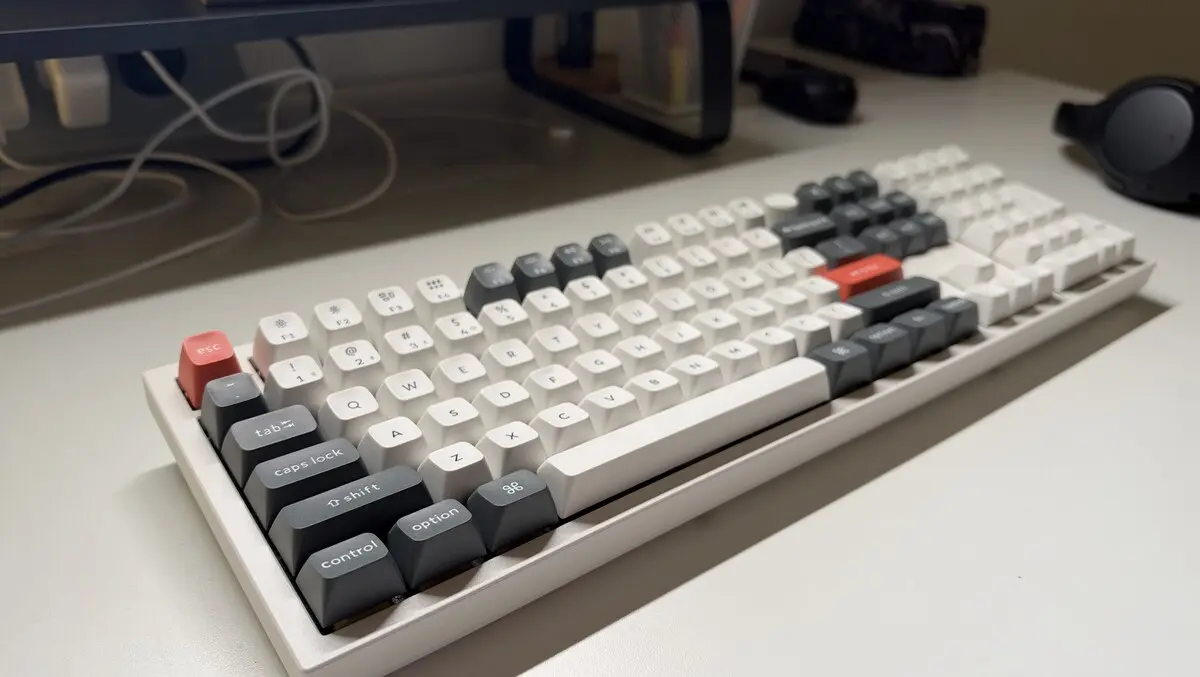
Hands-on review: Keychron Q6 Ultra 8K
Tue, 22nd Sep 2026 (Today)
I used to think keyboards were a rather mundane addition to a gaming or workspace setup.
I've reviewed (and used) dozens over the years, but after spending the past month with the Keychron Q6 Ultra 8K, I've started to see them differently. A keyboard can be more than something you simply type or game on - it can also double as a beautifully crafted piece of hardware that you actually enjoy using.
This full-size mechanical keyboard boasts features like 8,000 Hz polling, a hot-swappable PCB, and up to 660 hours of battery life. The downside? It costs just shy of $500 NZD.
First impressions and setup
Everything about the Q6 Ultra 8K feels premium and polished.
First off, it's heavy. In fact, I've brought home boxes from IKEA that weigh less than this keyboard. That's by no means a negative - this is a keyboard designed for a desk; it's not meant to be thrown in a bag for your daily commute. At around 2.2kg, it weighs twice as much as my MacBook Air.
The whole shell of the keyboard is engineered out of CNC aluminium, giving it an incredibly solid feel. There's virtually no flex or movement when you're typing, and it sits firmly on the desk rather than shifting around every time you hammer away at the keys.
That heft also contributes to one of the Q6 Ultra 8K's biggest strengths: it feels like a piece of hardware rather than just a peripheral.
Underneath the keyboard sits a stunning scratch-resistant backplate engineered from a polycarbonate that only adds to its distinctiveness.
The model I tested came with Keychron's Super Banana switches and double-shot PBT keycaps, which have a mild textured finish that feels great to touch. The switches are also hot-swappable, so if you're the sort of person who likes to tinker with your setup, you can swap them out with ease.
The initial setup is easy, whether you're on a Windows or Mac operating system. The Q6 Ultra 8K can connect via USB-C, Bluetooth or a 2.4GHz wireless connection, with the latter offering the low-latency performance you'd expect from a gaming-focused keyboard at this price point.
Keychron also provides its Launcher web-based software for configuring the keyboard. By utilising this, you can remap keys, create macros and adjust a range of settings without needing to install another bulky piece of software on your computer.
And, thankfully, the keyboard works perfectly well without any of this. Plug it in, connect it to your computer and start typing – although given how much customisation is on offer, I think it's worth spending some time getting it configured to your liking.
Features and performance
After using the Q6 Ultra 8K daily for more than a month, I think I'll find it hard to go back to my old keyboard. I've used it for both work and gaming, and each time I've done so, it makes me question the price tag less and less.
For starters, everyday use - from word processing to web browsing - is incredibly satisfying. From the way each key feels to how they sound, it's by far the best keyboard I've ever used. Unlike some other mechanical keyboards I've used, the sound isn't too metallic and I didn't find it distracting at all to work with.
The '8K' in the product name refers to 8,000Hz polling. This is one of Keychron's main selling points to gamers, and it effectively means the keyboard talks to your computer 8,000 times a second, reducing input latency. This, combined with the 2.4GHz connection, equates to an excellent gaming experience - particularly during fast-paced competitive gaming sessions.
Gamers and workers alike will also love the hot-swappable switches and software that enables you to fully customise key mappings, macros and other settings. There are endless ways to tailor the Q6 Ultra 8K to make it your own. If you own a Windows and Mac system, you can even save a layout for each.
The RGB lighting can also be heavily customised. You can scroll through presets on the keyboard itself, or dive into the Launcher software to further tweak the aesthetic. Each key has its own RGB light, so you can customise the colour of each key depending on your taste.
Keychron's claimed battery life of up to 660 hours seems to hold up - with regular use over the past month, I still haven't had to plug it in. When it does finally run out of juice, there is a USB-C port at the back of the keyboard for easy charging.
Verdict
The Keychron Q6 Ultra 8K is a magnificent piece of hardware, and after using it for more than a month, I understand why it commands a price tag of almost $500. Many of us spend hours a day at our desks, and having a good keyboard can make a world of difference.
The build quality is second-to-none, and the customisability means you truly can make the Q6 Ultra 8K your own - whether you're a gamer or not.
Yes, there are plenty of cheaper mechanical keyboards on the market, so I wouldn't necessarily recommend the keyboard for casual users, but if you do a fair bit of gaming or work from home a few times a week, I think the Q6 Ultra 8K is much easier to justify.
Until now, I've treated keyboards as nothing more than a necessary addition to my desk. After a month with the Q6 Ultra 8K, my perspective has changed.