

Hands-on review: Turtle Beach Stealth Pro II multiplatform wireless headset
Thu, 23rd Jul 2026.webp)
Turtle Beach's Stealth Pro II is an Xbox-branded wireless headset that also works with PC, PlayStation and mobile gaming platforms.
The package includes the headset, a Crossplay 2.0 transmitter dock, a 2m USB Type-C to USB Type-A cable, a Crossplay 2.0 wireless dongle, and two rechargeable battery packs. Everything is neatly stored in a premium, triangular Turtle Beach-branded clamshell carrying case with a zippered closure. While the box includes a quick-start guide, the complete user manual and the Turtle Beach Swarm II app can be downloaded from the company's website.
Having a single headset that works across all your consoles is a real advantage, and getting connected is refreshingly straightforward. I had no issues using the Stealth Pro II with a PC, PlayStation 5, Xbox Series X, Switch 2 and Samsung Galaxy Z Fold 6. While I didn't test it on every supported platform, it is also compatible with the Xbox Series S, Xbox One and PlayStation 4, making it a genuinely versatile option for multi-platform gamers.
For PC, the Stealth Pro II can be connected via the CrossPlay 2.0 transmitter dock, the wireless dongle or Bluetooth. On Xbox Series X|S, the transmitter dock connects through USB Type-A, with the switch on the underside of the dock set to the Xbox position. PlayStation 5 users can connect through either the wireless dongle or the transmitter hub in PC mode. Meanwhile, the Nintendo Switch, Switch 2 and mobile devices pair seamlessly over Bluetooth, making it easy to move between platforms.
You can also pick up an additional USB wireless dongle, allowing you to keep dedicated connections for your PC, PlayStation 5 and Xbox without constantly swapping devices around. It's a thoughtful touch that Turtle Beach has even included a storage slot for an extra dongle in the carry case, making it easy to keep everything together when you're on the move.
The dock and wireless dongle both use USB Type-A connections, which could be a limitation if your devices only have USB Type-C ports. That said, I had no issues using the wireless dongle with the PS5 Pro via a simple USB Type-A to USB Type-C adapter, so there are straightforward workarounds if you need them.
The dock itself is fairly minimalist, with the battery left on display while charging. There's no screen or additional functionality, such as the ability to change sound profiles directly from the dock. On the front, the status light doubles as the battery release button, glowing green when the battery is fully charged and flashing red while charging. It's a small thing, but that flashing light can become a little distracting if you tend to play in a dark room.
Having exchangeable rechargeable batteries is great, though. Not only does it mean that you can have one charging whilst the other is in use, but down the track, should a battery fail, you can easily get a replacement. Turtle Beach states that these batteries should last 30 hours between charges, so there's nothing to stop play.
Once the wireless dongle(s), transmitter hub and Bluetooth connections are set up, switching between up to four sources is as simple as pressing a button on the headset. It really is that easy. During testing, I was able to jump between Halo: Campaign Evolved on Xbox Series X and Assassin's Creed: Black Flag Resynced on PC for my reviews without ever needing to take the headset off.
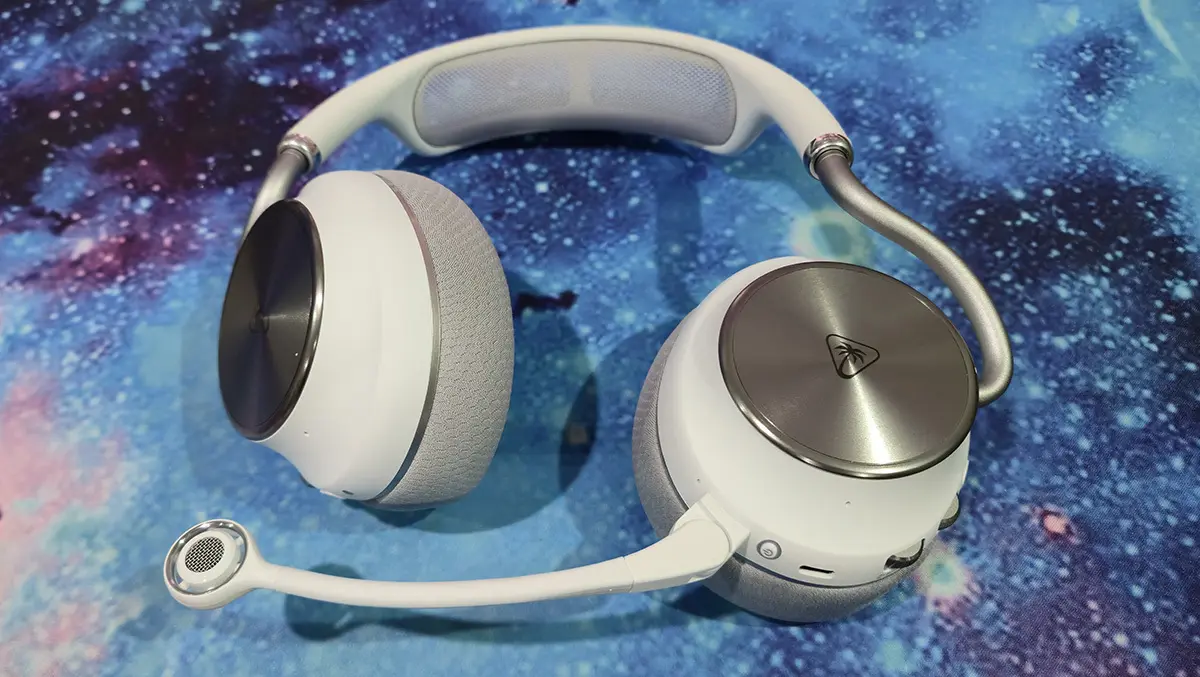
The Stealth Pro II is also a very comfortable headset, and the white finish with silver accents gives it a clean, stylish look. The cloth-covered memory foam earcups sit comfortably around the ears and offer plenty of adjustment, including the ability to fold flat when needed. I did occasionally find that an earcup could shift off my ear if I hadn't positioned the headset properly, but it wasn't a frequent issue.
The metal headband arms feel sturdy overall, although there's a little wobble when they're fully extended. The flexible microphone can be flipped up to mute and is removable if you don't need it, while also tucking away neatly when attached. Instead of traditional padding, the headband uses an elastic mesh strap for support, which is something I haven't come across before, but it proved comfortable in use.
The headset supports multiple audio streams. This means that you can listen to a Bluetooth source and the audio from the transmitter dock or wireless dongle at the same time.
As you'd expect from a premium headset, the Stealth Pro II sounds excellent across every source I tested. The audio is rich and detailed, bringing out nuances that can often be lost when using desktop speakers. It also carries Japan Audio Society certification for ultra-low-latency hi-res wireless audio and supports Dolby Atmos Spatial Audio, helping create a more immersive 3D soundscape.
My favourite feature, however, is the active noise cancelling (ANC). With a press of a button, it does an impressive job of cutting out background noise. In fact, I found myself using it even when I wasn't gaming, simply to block out distractions and focus. During gameplay, ANC makes it much easier to become fully immersed in the game world without outside noise breaking the experience.
Even though there are plenty of buttons and dials spread across the earcups, the layout is easy to learn and navigate by touch while wearing the headset. On the left earcup, you'll find the mode button for toggling ANC, along with the main volume dial, the game/chat audio mixer dial and the power switch. The right earcup houses the source selection button, a dedicated Bluetooth volume dial and the Bluetooth pairing button.
The controls are well placed, and the volume dials are large enough to find and adjust without fumbling around. Having a separate Bluetooth volume control is particularly useful, allowing you to balance music, podcasts or voice chat from your phone independently of your game audio. It makes it easy to listen to Spotify in the background while still keeping in-game sound at the level you want.
For those who like to fine-tune their audio, the Turtle Beach Swarm II app for PC offers a solid range of customisation options. Through the app, I was able to adjust the EQ using a 10-band equaliser, tweak ANC sensitivity and modify mic noise gate settings. There's also Turtle Beach's Superhuman Hearing mode, which enhances key in-game audio cues such as footsteps and reloads, making it easier to pick up important sounds during competitive play.
Turtle Beach's Stealth Pro II is a versatile premium headset that comes in at a mid-range price point. It has a distinctive design, with the metal earcup arms and mesh head strap cushion helping it stand out from the crowd. The transmitter hub and wireless dongles make one-touch source switching simple and hassle-free, while the two exchangeable batteries are a genuinely useful addition. The fact that it works across all my devices ticks the final box, making the Stealth Pro II an easy headset to recommend.