

Hands-on review: Apple MacBook Pro 14-inch M6 assessed
Wed, 25th Nov 2026 (Today)
Apple's 14-inch MacBook Pro with M6 updates the processor and wireless connectivity within a familiar aluminium chassis. Its appeal still rests on screen quality, battery life and useful connections.
This Space Black configuration offers room for substantial local projects, but costs considerably more than the entry-level model.
Familiar design
The enclosure remains solid and neatly finished. At approximately 1.55kg, it is portable, though noticeably heavier than a smaller MacBook Air. Its compact footprint suits regular travel better than a larger workstation.
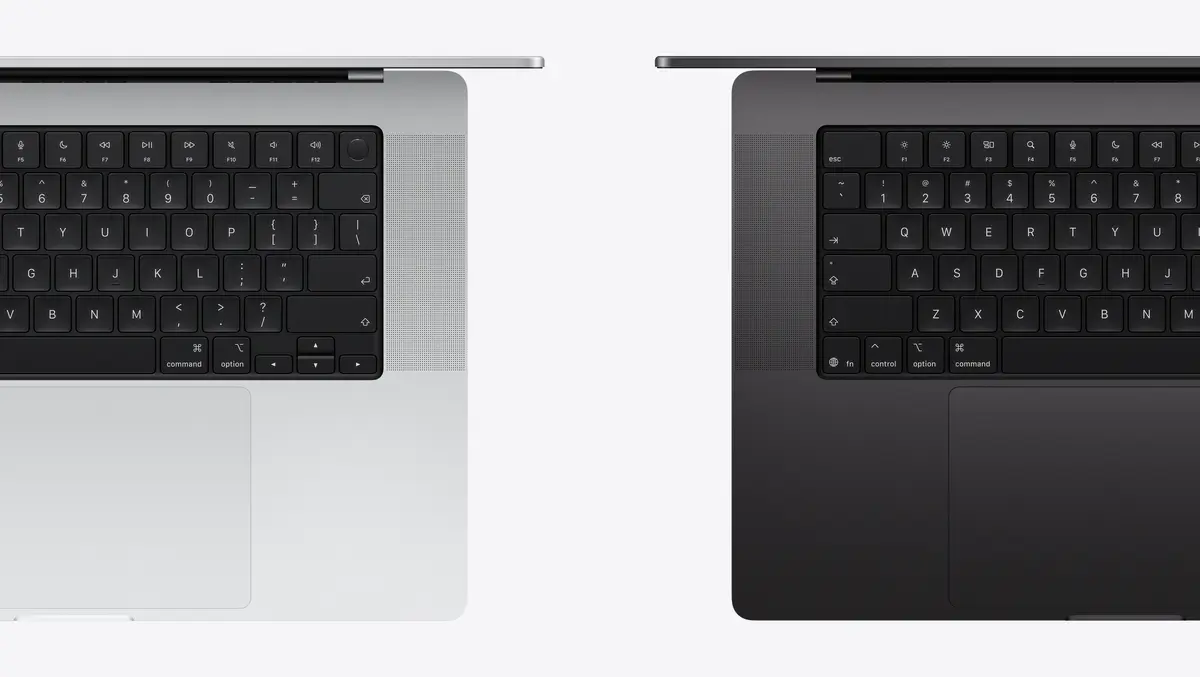
Space Black gives the chassis a restrained appearance. The finish is designed to reduce fingerprints, though marks remain possible.
Build quality remains a strength, but there is little to tempt buyers seeking a redesign.
Screen appeal
The 14.2-inch Liquid Retina XDR display remains a persuasive reason to choose this machine. Its 3024 × 1964 resolution provides a sharp workspace for text, photographs and video timelines. ProMotion adjusts the refresh rate up to 120Hz for smoother scrolling and interface movement.
Mini-LED backlighting delivers strong contrast and bright HDR highlights. Apple specifies peak brightness of up to 1,600 nits for HDR content, rather than routine desktop use.
Nano-texture glass reduces reflections, making it useful near windows or under strong overhead lights. Its value depends more on the working environment than the applications used.
For a desk with controlled lighting, the standard display remains a reasonable choice. Compare both finishes before paying for the upgrade.
The screen retains its camera notch and lacks touch input. Nano-texture changes the surface treatment without addressing either limitation.
Daily controls
The keyboard's defined response and comfortable key travel suit lengthy writing sessions. Touch ID provides convenient authentication through the power button.
The large Force Touch trackpad supports precise gestures and consistent haptic feedback. These familiar controls contribute more to everyday usability than the annual processor update.
The 12MP Centre Stage camera adjusts framing during calls, with image quality benefiting from good room lighting. The six-speaker system delivers clear speech and fuller music playback than many compact laptops. Headphones are optional for casual listening.
Measured progress
M6 combines a 12-core CPU with a 12-core GPU. The CPU comprises two super cores, four performance cores and six efficiency cores.
Performance improves on M5, but the difference is incremental for everyday work. Browsing, document editing and switching between applications were already responsive on the previous model.
Photo processing, code compilation and video exports provide stronger reasons to upgrade. Hardware support for formats including ProRes and HEVC also benefits compatible editing applications.
For sustained rendering and complex professional video projects, compare M5 Pro and M5 Max systems. A newer chip name does not guarantee higher performance in every workload.
Replacing a recent MacBook is difficult to justify if it already handles these tasks comfortably.
Memory matters
The 32GB configuration gives demanding applications more room to run together. It suits large photo libraries, development tools and projects that strain a 16GB machine.
Unified memory serves the whole system, including graphics, so capacity matters beyond the number of open browser tabs. This configuration supports memory bandwidth of up to 170GB/s.
The 4TB SSD allows more footage, image libraries and project files to stay on the computer. That convenience is valuable away from a desk, but extra capacity does not guarantee better performance.
A smaller SSD paired with external storage may offer better value. Choose memory and internal storage at purchase, as neither offers a routine user upgrade.
AI perspective
M6 includes a dual 16-core Neural Engine and neural accelerators in the GPU. These support compatible AI workloads, including models that run locally.
Apple claims faster AI processing than M5, though results depend on the application and model. Extra memory can accommodate larger workloads without removing software compatibility or capacity constraints.
The laptop ships with macOS 27 and supports Apple Intelligence. Judge these features against specific tasks. Demonstrable improvements to an existing workflow make a stronger purchasing case than general AI promises.
Useful connections
Three Thunderbolt 4 ports sit alongside HDMI, an SDXC card slot and a headphone socket. MagSafe 3 provides a separate charging connection, leaving USB-C ports free for accessories.
The card reader is convenient for photographers, while HDMI simplifies connecting a monitor or presentation screen. Support for up to two external displays also suits desk use.
Wi-Fi 7 and Bluetooth 6 update the wireless specification, but their capabilities require compatible equipment. An older router cannot gain newer features from the laptop.
Battery expectations
Apple rates battery life at up to 24 hours for video streaming and 16 hours for wireless browsing. These figures describe separate uses, rather than guaranteed working-day endurance.
Battery life is strong under lighter workloads. Video editing, rendering and high display brightness shorten the time between charges. This 32GB and 4TB configuration should not be assumed to match results from differently equipped machines.
Fast charging requires a compatible 96W or higher power source. Apple says a suitable setup can reach 50 per cent charge in around 30 minutes. Check which adapter is supplied in your purchase region when calculating the total cost.
Final verdict
The base model pricing starts with a 14" display, 16GB of RAM and 1TB of drive space for AUD $3,199 / NZD $3,999.
Increase that by AUD $225 / NZD $300 if you want the nano-texture display.
Additionally AUD $1,600 / NZD $2,000 if you want to choose the 16" display model.
The 14-inch M6 MacBook Pro remains a leading professional laptop with a strong display and useful controls. Its processor update improves an established design without changing its character.