

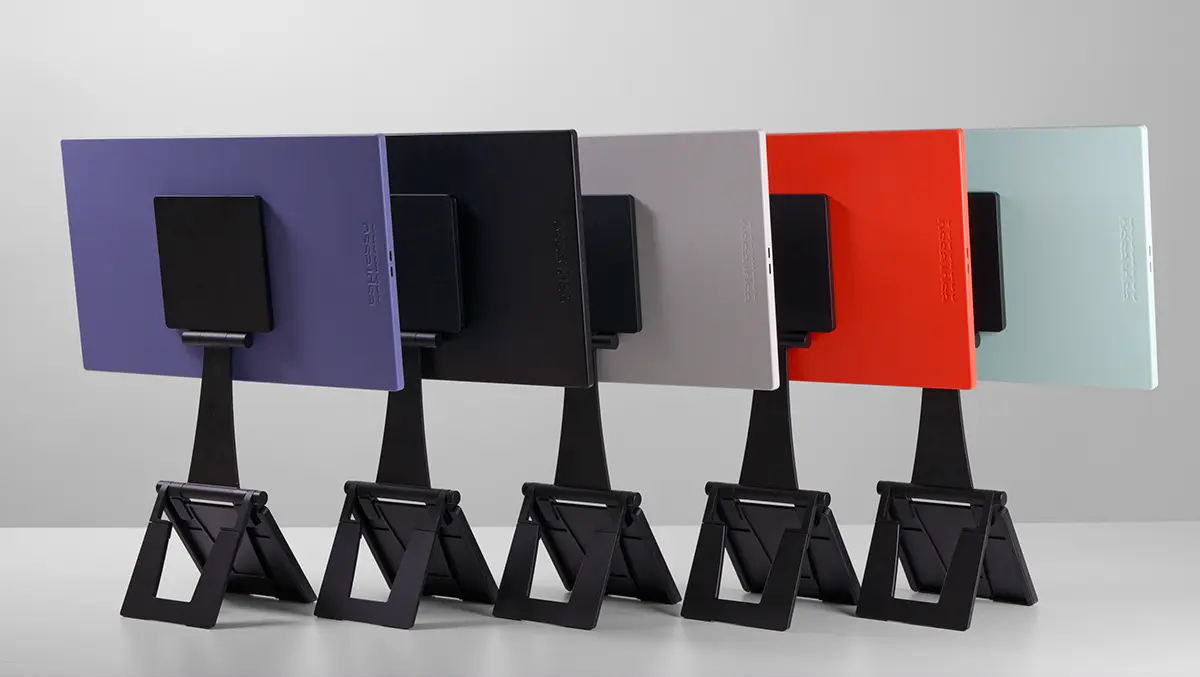

The Espresso Lite 15 is a slim 15.6in USB‑C monitor with a magnetic stand, giving laptop travellers a proper second screen with no power brick.
Product snapshot
The portable monitor is built to add a second screen to a laptop, tablet or compatible phone. It uses a 1920 x 1080 LCD panel with a 60Hz refresh rate. espresso quotes 100% sRGB coverage, 16.8 million colours and a peak brightness of 400 nits. Two USB‑C ports handle video, power and pass‑through charging. The box includes the display, a magnetic Stand+ and a USB‑C cable.
A second screen is most useful for simple multitasking. It lets you keep reference material open while you write, or keep messaging off your main workspace. The Lite 15 is built around that everyday workflow.
Design choices
The Lite 15 is positioned as the range's entry model and it swaps aluminium for PC/ABS plastic. The front uses 6H‑rated glass. Weight is 700g and the chassis is 9.5mm at its thinnest point. Five colour options are available: black, white, mint, orange and purple.
Plastic keeps weight down and allows the brighter finishes. The glass front should also be straightforward to clean after time in a shared bag.
Screen quality
Full HD at 15.6 inches suits documents, spreadsheets and web work. Text looks clean without extreme scaling. The sRGB target is sensible for general use, but this is not a wide‑gamut display for print work or HDR finishing. A matte surface reduces reflections, which helps when you are working under strong overhead lights.
The 400‑nit rating should be comfortable indoors, but direct sun will still wash out dark content. Higher brightness also means a bigger pull on laptop or tablet battery, so power planning matters on long days away from a socket. 60Hz is fine for work, but not for high-refresh gaming.
Stand system
A redesigned magnetic Stand+ is included in the box. It folds flat for travel and attaches to the back of the monitor using magnets. Stand+ supports both landscape and portrait use, with a wider range of height and tilt positions than the common folio cover.
You can run the Lite 15 beside a laptop, or lift it above the laptop screen for a stacked layout. The extra height can be more comfortable than a low kickstand on a tiny desk. It also makes the Lite 15 easier to use as a portrait display for chat, code or long documents.
Port layout
The Lite 15 only uses USB‑C. There is no HDMI input. That keeps set‑up simple with modern machines, but it also makes compatibility the main buying question. Your device needs a USB‑C port that can output video, typically via DisplayPort Alt Mode. Some USB‑C ports only handle charging and data, so they will never produce an image.
The two USB‑C ports sit centrally on the display. It helps cable routing on either side of a laptop and looks neater in portrait mode. The second USB‑C port supports power pass‑through. Plug a USB‑C charger into the monitor and it can charge the host device while the display is in use. This is the cleanest way to work for long sessions, and it avoids a steady battery drain. If your laptop has only one video-capable USB‑C port, pass‑through means you do not have to choose between power and a second screen.
Owners of older laptops should check their options before committing. If you do not have a USB‑C video output, you will need a compatible adapter or dock that can feed the monitor. External power may also be required.
Tablet and phone use can work, but it depends on the device. A USB‑C iPad can drive an external display, and phones with desktop modes can benefit from the extra space. External power is still useful if you want higher brightness for longer.
Software extras
The Lite 15 is not a touchscreen, which is the clearest compromise versus pricier models in the range. The optional espressoFlow download for Mac and Windows adds tools such as window snapping, workspace management and auto‑rotation support. "Glide" is designed to make the cursor move between screens without manual alignment in settings.
Power impact
Maximum quoted power draw is 5W at full brightness. That is modest, but it still affects battery life when you are working untethered. Pass‑through charging is the obvious answer if you already carry a USB‑C charger for your laptop.
Buying advice
It is listed at USD $249 in the US, GBP £219 in the UK, EUR €269 in Europe and AUD $399 in Australia. It costs more than the cheapest 15.6‑inch portable monitors, but the stand system and port placement are practical advantages.